Welcome to Vision Through Sound
Vision Through Sound enables visually impaired people to live their lives more fully by learning to use smart phones and computer technology.
We will help you to use a phone or computer for work and for pleasure – to browse the Internet, to send emails, to download files, to contact friends and family, to join online communities – in fact, whatever you need a computer to do for you, we will give you the confidence and the tools to make it happen.
Braille is such a liberating means for a blind person to be able to read fluently and with expression, in a way that speech output from a computer does not give.
Braille can bring literacy, education and employment.
Vision Through Sound works alongside Bristol Braille Technology to discover how blind people would design a multi-line Braille display that will give them the information they need from files, tables or the internet. Our Canute Scientific is the latest in a series of new models which display everything in print as well as Braille. Ideal for sighted and blind colleagues working together, or sighted teachers with blind pupils in school. I find such joy in being able to read more than just one line as it makes the information so much easier to comprehend. The Canute Scientific is particularly helpful for reading maps, graphs, tables, and anything that needs to be in 2 dimensions. This is the first machine of its kind in the world, and we are constantly discovering new applications that can be written so that blind people can do things that they have not been able to do before.
Transport Maps
Thanks to the National Centre for Accessible Transport you can now email stephanie@visionthroughsound.co.uk with the stations and train lines you would like to explore, and Steph can send you the paper tactile diagrams showing the connections between all the stations. These can also be generated on a Canute Console or Scientific. This applies to all forms of public transport.
The Canute Console
The Canute Console is a nine-line Braille workstation for professionals and students doing programming or viewing and manipulating data.
Here are some of the applications for the Console:
- Programming and word processing
- Top down map exploration of cities
- Football and sports playback on tactile pitches
- Snake, Rogue-likes and other classic videogames
- Spreadsheets and tables
- Flow diagrams, charts and graphs
- Free drawing ASCII graphics
It is composed of a Canute 360 Braille display docked in a workstation that adds a pull-out QWERTY keyboard, a fold-up 13″ high contrast monitor, and runs off a Raspberry Pi 400 from the Linux command line.
Braille is literacy, employment and independence… it can also inspire us to do more, learn more, and most of all, to make more. We’re really excited to finally release the Console after over a year’s development. Its involved hundreds of miles travelled by planes, trains and automobiles, and great creative sessions with blind, deafblind and low vision Braille readers.
By pre-ordering you are supporting a business that has always been a not-for-profit, dedicating everything to creating devices with and for our community.
Thank you
Vision Through Sound is actively working with Bristol Braille technology, to design, promote and develop new applications for the Canute Console and provide technical support to customers.
Click here to learn how to order your Canute Console
Click here for an introduction to the Canute Scientific
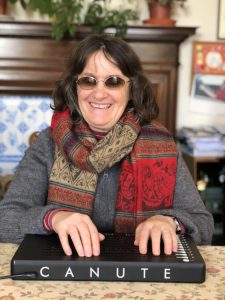
Here are 3 reviews of the Canute Console:
From an A level Maths student:
“I am getting on well with the Canute. The spreadsheets are good and easy to use and understand. I have also tried the LaTeX braille code mode for maths. I think this could be useful.”
A deaf blind Maths graduate from the Open University has been able to gain a higher grade degree than expected due to the use of a Canute Console. She says:
“I found the Canute most useful for tables and flow charts, where you have to keep going back and forth between different columns and rows, so it was really good to have the whole thing on one page. Also, things like equations with algebraic symbols or brackets sometimes take up a lot of room in Braille, and again it’s really helpful to have it all in front of you. While you are working on it, especially as questions often ask you to do something based on what you have done before, you need to be able to refer back to it quickly. This is really awkward if you are doing it on a computer with a screen reader or a Braille display with only one line because you can miss something easily, which often messes the whole thing up. You know the old saying “for want of a shoe the kingdom was lost”? In Maths, a decimal point in the wrong place, or a zero missed off the end of a large number can completely destroy the product of half an hour’s hard work!” – Simmie Gould.
Hollie Baker an associate lecturer at Bath Spa university:
“I recently acquired a Canute Console and have been using it extensively to help me deliver and prepare classes, as well as mark students’ work.
Simply having access to lecture notes in multi-line Braille, and being able to use the Console’s file conversion facilities to quickly convert files, has given me so much more confidence and fluency in delivering classes, not to mention the freedom to take on new courses at short notice, as I no longer need to learn the material by heart. In addition, the console’s spreadsheet software has been enormously beneficial in marking coursework. Now I have the ability to quickly review a brakedown of marks for several students at a time, and the compatibility with MS Excel has meant that I can use the same marking spreadsheets as my colleagues.
One of the best things about the Canute Console is its open source ethos. The fact that their libraries are all published has meant that I was able to quickly develop applications to suit my specific needs. Bristol Braille Technology have recently released a Tactile Transport Map program which shows stations and their connections on an interactive map. I was able to adapt this to view directed and undirected graphs represented in the Graphviz format. Graphviz is widely used to represent structures in maths and computer science, such as state machines and computation trees. It also allows things like flowcharts and organisational charts to be displayed. More recently, I have been working with a group of students at Bath Spa University to develop a Choose Your Own Adventure creater, based on the graph viewer, to allow people to create and play stories, as well as export them to the Twine format.
I have created a number of examples such as Pascal’s Triangle and the Periodic table, which can be viewed on the Canute Console. Bristol Braille Technology have created a standard for multi-line Braille Applications called the Canute Tactile Commons and the flowchart viewer and these examples all use these conventions, meaning that we are well on our way to creating a consistent language for displaying graphics in multi-line 6 dot Braille.
I built a chess game which is displayed in synchronous Braille and visual form, allowing a Braille and print user to play together. Although this was initially created as a bit of fun, I have since realised its potential as a tool to teach Braille readers spacial awareness, as they have to discover the positions of the pieces and which pieces can take/be taken by which others, meaning they need to explore the chessboard horizontally, vertically and diagonally, often with two hands.
Bristol Braille and Vision Through Sound have been very receptive, as well as record some demo videos with Steph Sergeant from VTS. We have developed the Orca screenreader on Linux to allow it to display multi-line Braille on the Canute, as well as develop on its recent integration of the MathCAT library for displaying high quality mathematics in Braille.”
Here are some videos of Hollie Baker showing Steph some of features of multi-line Braille on the Canute:
Truncating columns in tabular Braille on the Canute Scientific
Braille mathematics and mathematical diagrams on the Canute Scientific
Building a Braille periodic table app in under an hour on the Canute Scientific
Creating and annotating Braille flow charts on the Canute Scientific
Using a spreadsheet to mark coursework in Braille on the Canute Scientific
CANUTE 360 LOW COST BRAILLE DISPLAY
The Canute is a braille e-book reader, the first multi-line Braille display in the world.
CANUTE 360: What People Are Saying
Looking for reviews and insights from users of the Canute 360? Here are some expert opinions and demonstrations of the device:
- Judy Dixon’s Review (American Foundation for the Blind): Read here
- David Woodbridge’s Podcast Review: Listen here
Adult Safeguarding Certified
Awarded to Stephanie Sergeant who has completed her SafeCIC Adult Safeguarding training.
In Your Pocket – A Low Tech, Voice Operated Phone
In Your Pocket is a voice-operated, low-cost smartphone, providing easier access to thousands of talking books, daily newspapers, radio stations, RNIB new agents and podcasts. It has the handy features we are all used to, such as a simple to use Sat Nav function and it is easy for the less technically able to use.
Imagine when you need to be able to see something in your surroundings, to be able to just say ’Be My Eyes’ to your Pocket and it will connect the camera, microphone and speaker to one of the million volunteers who can then describe what it is you need to know about.
The RNIB and Torch Trust audio libraries can all be listened to. Plus, there are now 100s of internet radio stations available on In Your Pocket too. Just tell your Pocket what you wish to listen to by station, location or subject and it will list the appropriate stations for you to choose from. AI is being used to take pictures and describe the photos.
Enabling Project
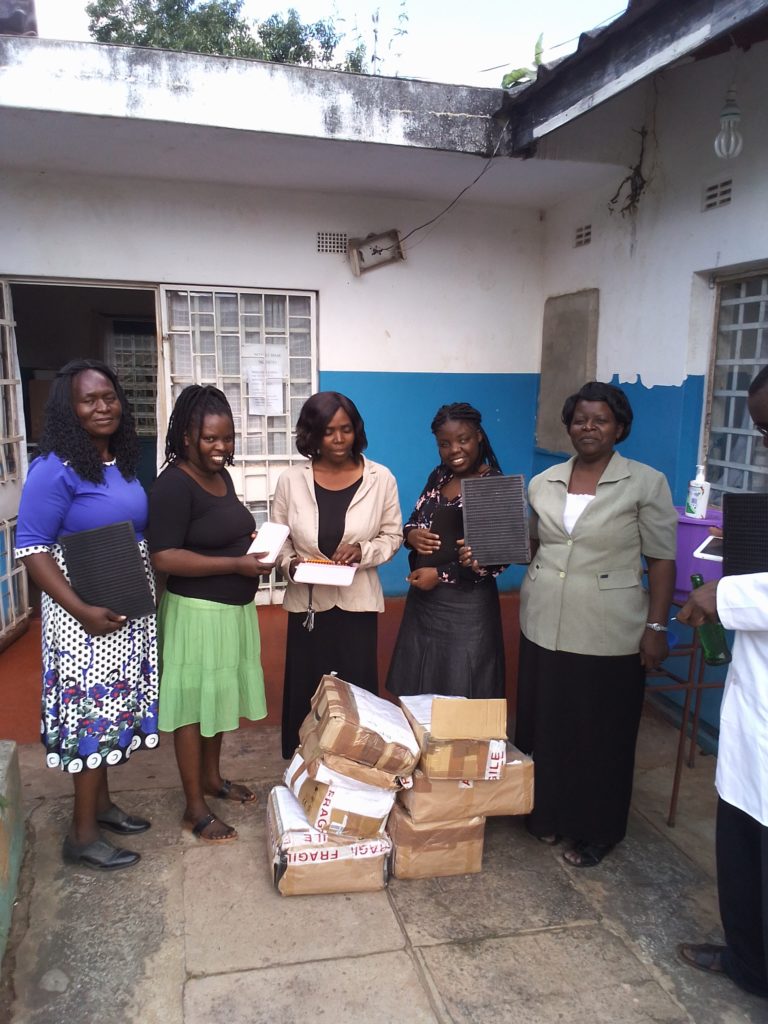
I have provided training and resources for students at the Lions School in Ndola, Zambia, and helped blind adults in another local village with the marketing and sale of their products.